No more lost chits.
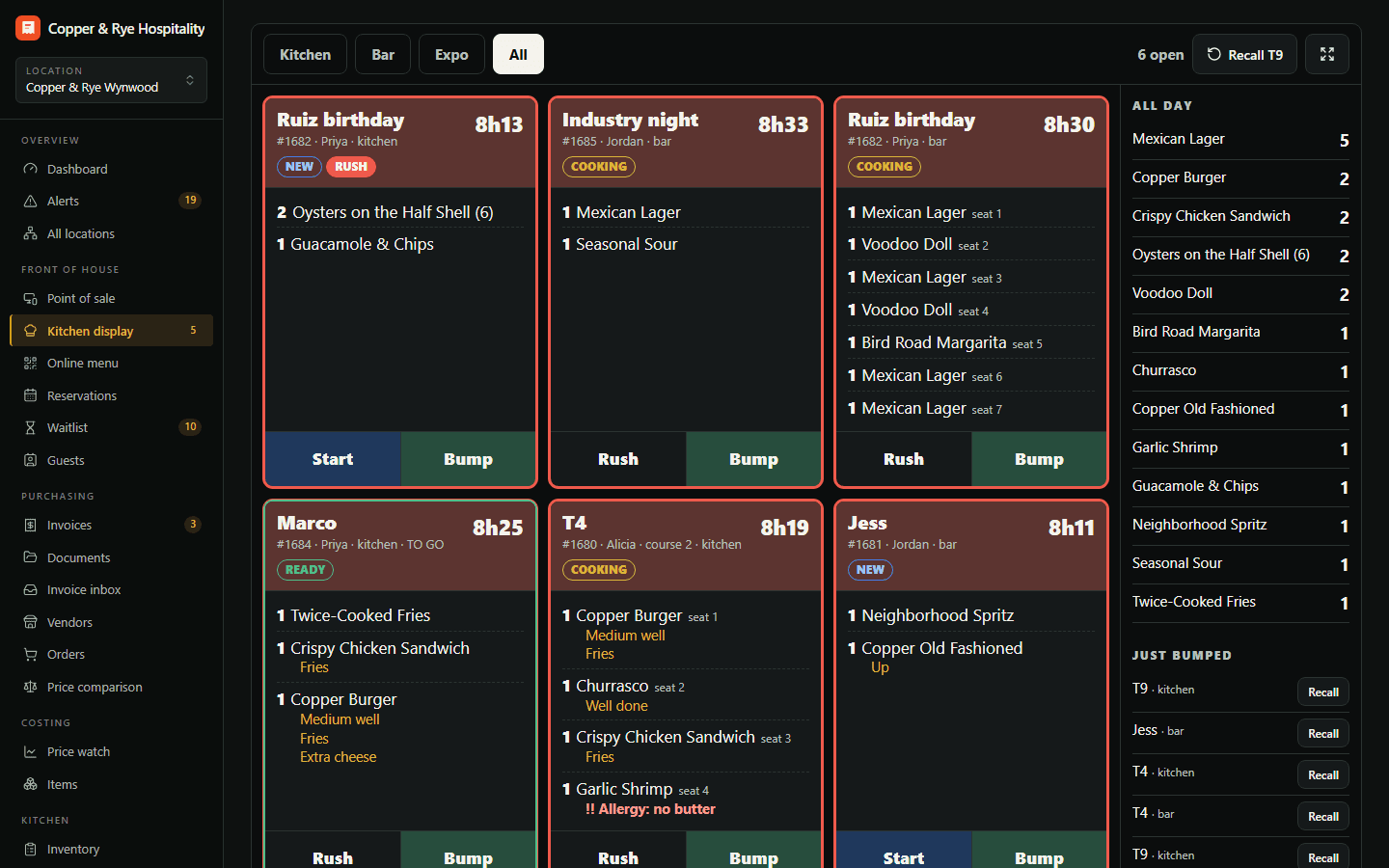
Every fired course lands on the right station's screen — kitchen, bar or expo — with ticket timers, rush flags and bump-to-done.
A printer jams on the busiest night of the week, a ticket falls behind the pass, and table twelve waits forty minutes for a burger.
Every fired course lands on the right station's screen — kitchen, bar or expo — with ticket timers, rush flags and bump-to-done. No more lost chits.
Tickets on a screen, by station, with timers.
- Kitchen, bar and expo stations
- Ticket age timers turn amber then red
- Bump, recall and all-day counts
Kitchen, bar and expo stations
Route each menu group to the station that makes it. The bar sees drinks, the line sees food, expo sees the whole table.
Timers that change colour
Every ticket ages on screen and turns amber, then red, at the times you set — the rush is visible before it's a problem.
Bump, recall and all-day counts
Bump a finished ticket, recall it if you were wrong, and see how many of each item are working across every open ticket.
Try Kitchen display free for 14 days.
Start a trial with Kitchen display on its own, or as part of any plan — and add or drop modules any month.